Today
See your day at a glance
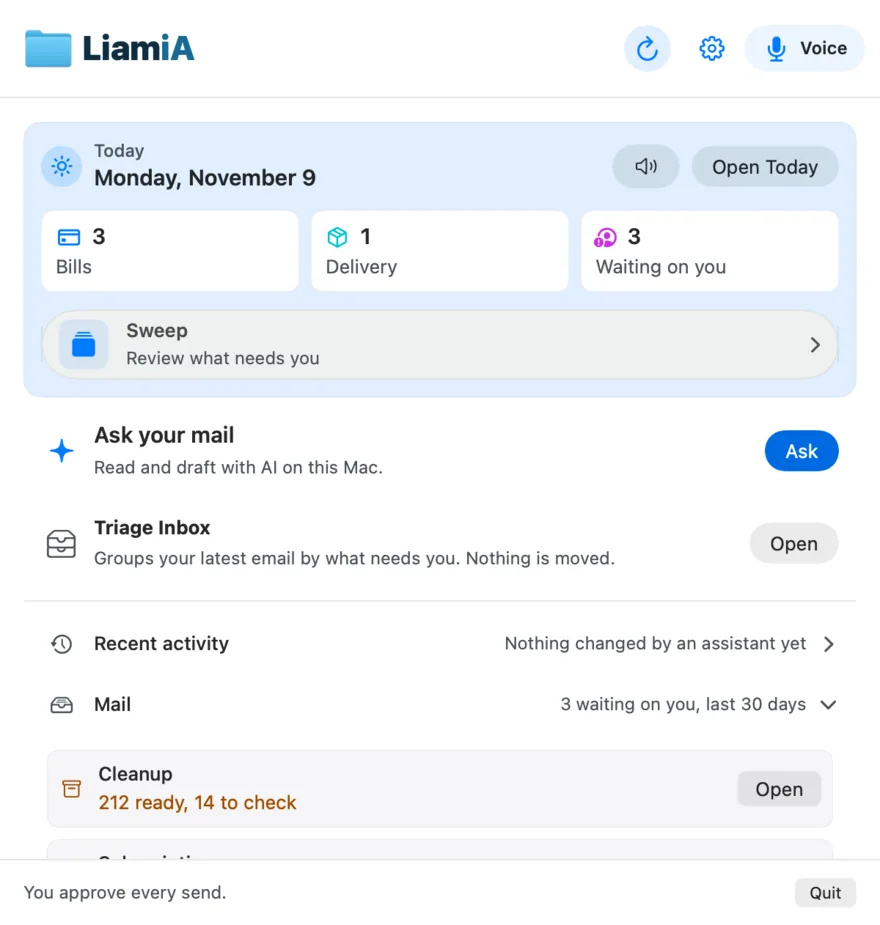
Click the icon in your menu bar. Today's bills, deliveries and the people waiting on you are already there.
Liamia is AI Mail spelled backwards. It was called MailBridge until November 2026.
Ask in plain words and AI finds, sorts and drafts your email across your Apple Mail accounts. Nothing is sent until you click.
Free for 7 days, then $39 a month. No card to start.
For Mac, macOS 14 or later.
A small app in your Mac's menu bar. It works with every IMAP account in Apple Mail: Gmail, iCloud, Yahoo, work and your own domain.
Today
Click the icon in your menu bar. Today's bills, deliveries and the people waiting on you are already there.
Ask
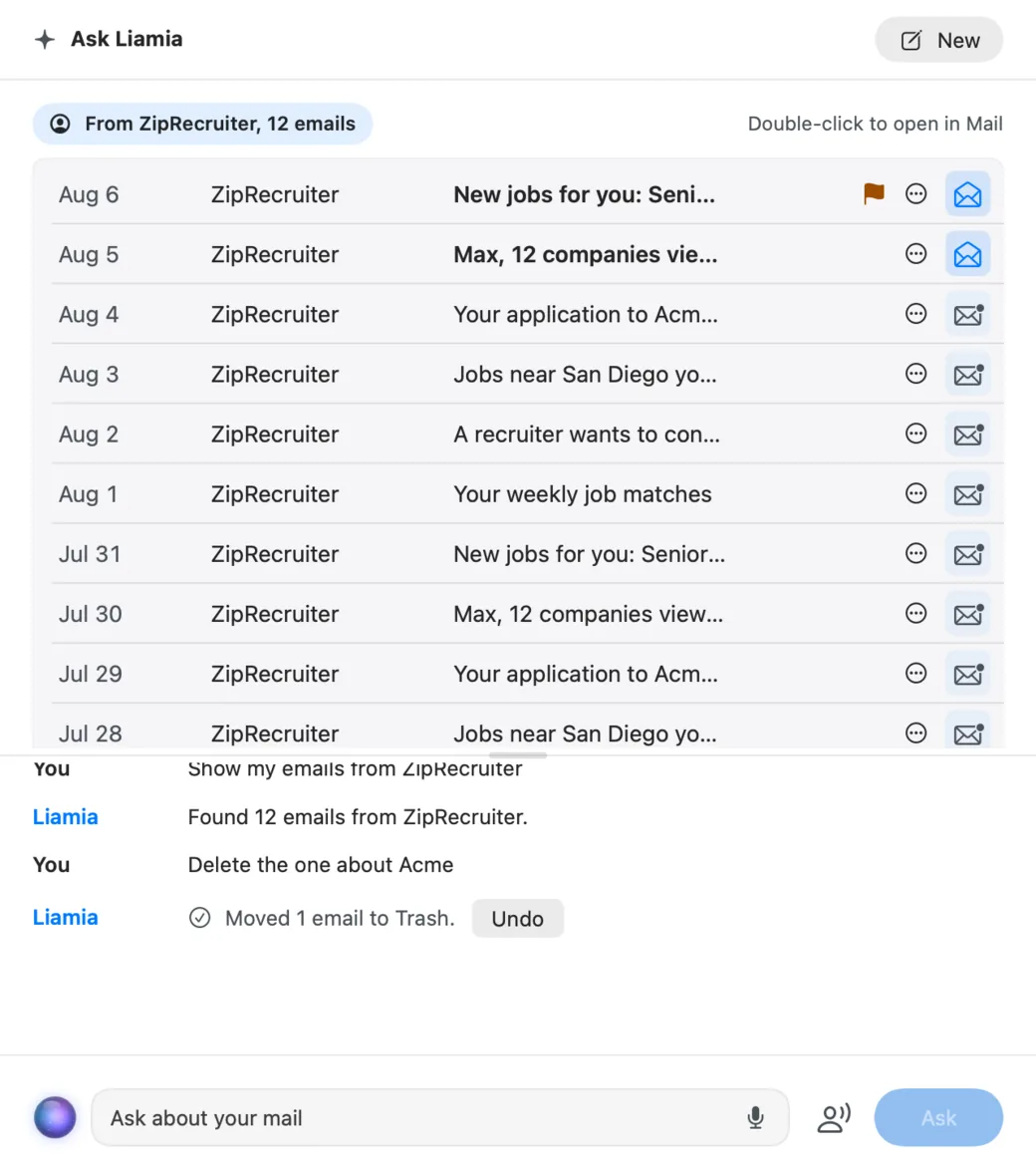
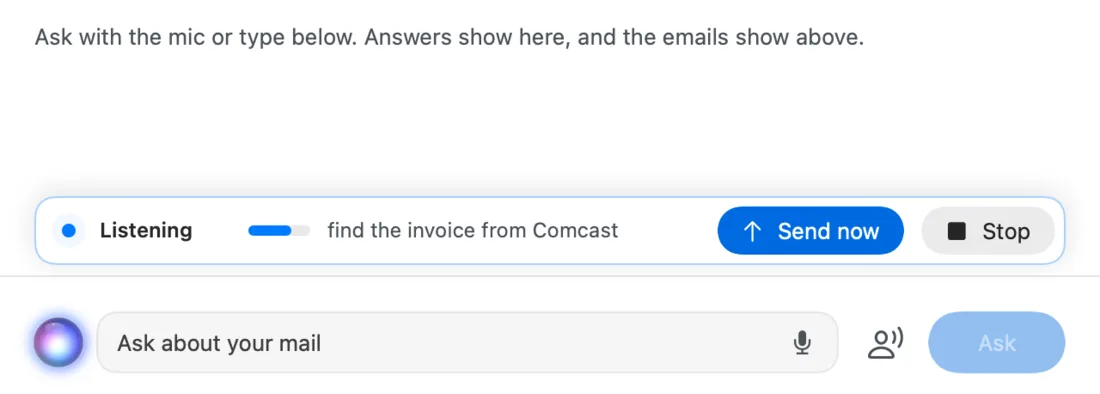
Press the mic and say "find the invoice from Comcast." Your Mac turns your words into text, and the emails it finds show up right away.
Answers can be read back to you in a natural voice.
Sweep
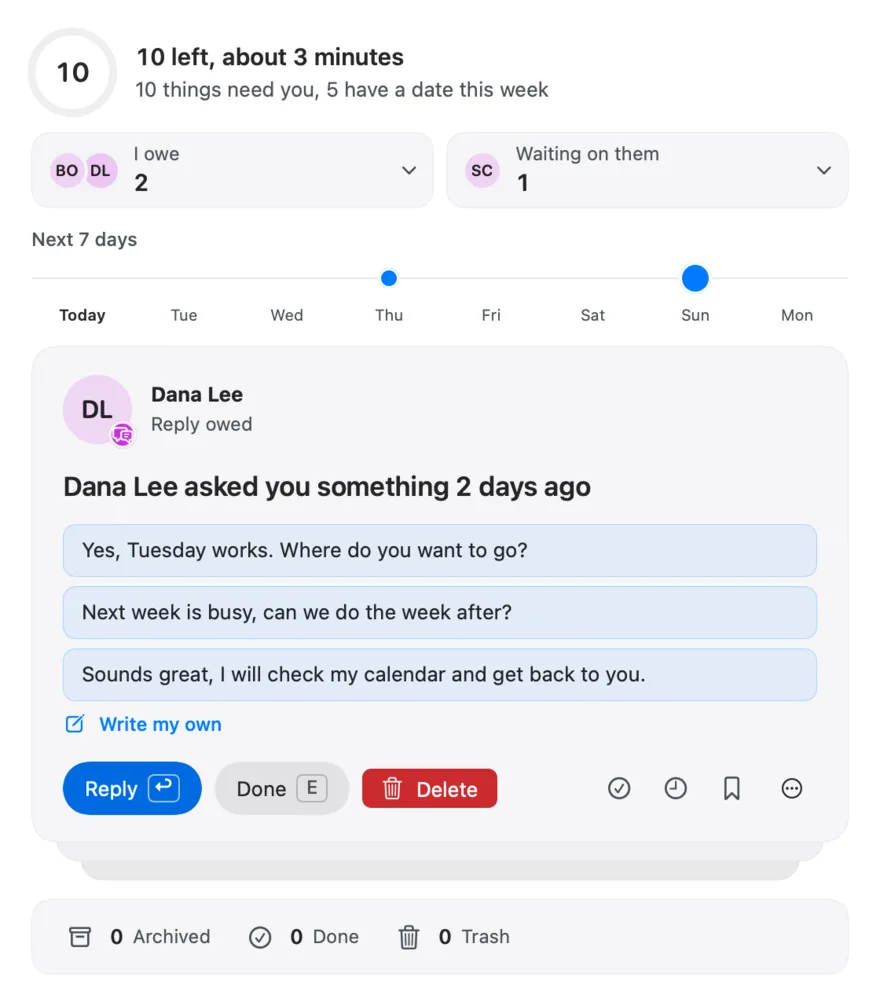
Sweep shows what needs you, most urgent first. Pick a short reply written in your style, or mark it done with one key.
Changed your mind? Undo works for a minute.
Your click
Before any email goes out, Liamia shows who it is to, the subject and every word. Only your click on Send sends it.
No setting skips this. Save as draft is the default.

Liamia: send this reply?
From: you@example.com
To: Dana Lee <dana@example.com>
Subject: Re: Lunch next week?Yes, Tuesday works. Where do you want to go?
Only this button can send.
Assistants
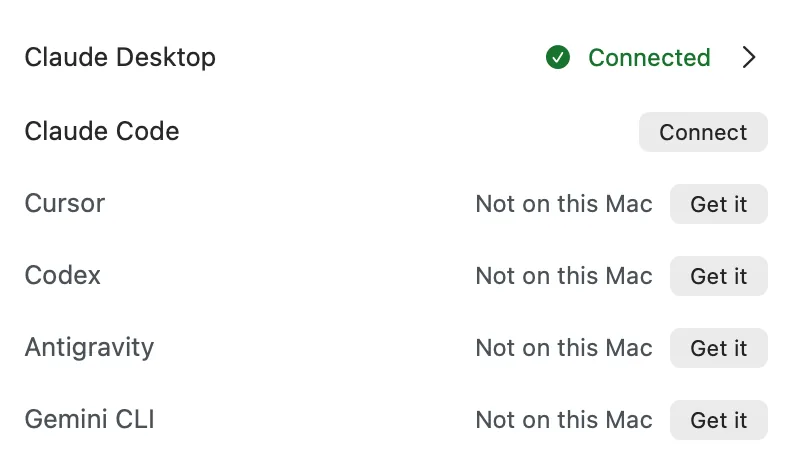
Connect Claude Desktop, Claude Code, Codex or Cursor in one click. They can then search, sort and draft across all your accounts.
A cloud assistant sees the emails it reads for you.
On your Mac
The built-in assistant runs a free local AI with Ollama, so your email is read on your Mac, not in the cloud. No email password, no AI subscription.
Liamia reads the mail Apple Mail already keeps on your Mac.

Every feature. No card, no sign-up.
Billed monthly. Renews automatically until you cancel. Cancel any time online, and Liamia keeps working to the end of your current paid billing period.
What your subscription gets you
$39 a month plus any tax shown at checkout, charged by Lemon Squeezy each month until you cancel from your receipt email or My Orders. Terms.
macOS 14 or later. Apple silicon and Intel.
How it works
Installed Liamia? Add it to your editor in one click. Claude Desktop and Codex connect from the Liamia menu.
Tools for reading, drafting, and organizing mail. These eight cover common tasks. Only request_send can put mail in the world, and it hands the decision to you.
list_inboxRecent messages from every IMAP account in Mail.app, or just one, newest first.
read_messageThe message text (up to 20,000 characters) and key headers, so the assistant can understand it.
digestWhat is waiting on you, what is waiting on them, and how many bulk senders are in your mail.
waiting_on_youInbox mail from real people, not bulk senders, that you have not answered.
find_attachmentsThat PDF someone sent in March, found by name or sender.
move_messageFile a message into another mailbox. Never deletes.
save_draftWrite a reply into Drafts. Saving a draft sends nothing.
request_sendneeds your clickShows you the exact recipient, subject and body in a Liamia dialog. Only your click sends it through Mail.app.
No assistant needed. Open the menu bar window and it already knows what is waiting on you.
Even an AI that runs only on your Mac sees every account. Pick a free Ollama model on Apple silicon and it reads, sorts and drafts well, with no cloud, no subscription and no API key.
Jev, TypeSafe's decision model, answers four questions about every message: what kind it is, whether it needs a reply, whether it needs an action, and how urgent it is. Liamia ranks your inbox on those answers, so what needs action sits above receipts and newsletters. It is optional and off until you switch it on, and it runs on your own TypeSafe key, billed by TypeSafe.
Measured on 100 real inbox messages, 2026-09-20.
Off by default, and only for the accounts you tick. Jev gets the sender, the subject and a preview of up to 300 characters with addresses and numbers blanked out, plus three yes/no flags. Never the full email, a recipient or an attachment. The app shows a receipt of what left. Switch it off and sorting stays on your Mac: the local AI through Ollama if you have it, otherwise your rules and date order.
Open-source MCP servers for Apple Mail exist, and they are a good fit if you like a terminal. Liamia is for people who want it to work like a Mac app.
| Liamia | Typical MCP server or cloud connector | |
|---|---|---|
| Install | Drag to Applications. One click connects Claude Desktop or Codex. | Varies. Some install with one command or a Claude Desktop bundle; many need a runtime and a JSON config. |
| Signed by Apple | Developer ID signed and notarized. | Varies. Most run as Python or Node scripts; few are notarized. |
| Sending | Every send opens a dialog with the exact recipient, subject and body. No setting skips it. | Depends on the project. Read its code before letting an assistant send. |
| Without an AI subscription | Built-in assistant on a local Ollama model. | Needs an MCP client such as Claude Desktop. |
| What holds your mail | Nothing. No OAuth token, no password. Liamia reads Mail.app's files on your Mac, and the only thing that can send is your click in the dialog. | Cloud connectors hold a token. Google's own Gmail MCP server has no send tool, yet its setup mints a token with the gmail.compose scope, which Google documents as "manage drafts and send emails". |
| How it reads mail | Mail.app's local store. IMAP accounts work without sharing passwords; Exchange and POP are not supported yet. | Often AppleScript per message, which is slow on large inboxes. |
| Price | 7 days free, then $39 a month for 3 Macs. | Free. |
See the full comparison, with named free servers, Mailbutler and Spark, checked November 7, 2026.
Questions
Any IMAP account Mail.app is signed in to: Gmail, iCloud, Yahoo, Outlook.com over IMAP, work IMAP servers and your own domain. They all work the same way, because Liamia reads Mail.app rather than the mail service. Exchange and POP accounts are not supported yet: Liamia lists them and says it cannot read their mail.
Yes. Inside the app is a signed MCP server that Claude Desktop, Claude Code, Codex and Cursor launch like any other local tool. It reads Mail.app's local store and asks Mail.app to draft, file and send.
A Liamia connector for ChatGPT desktop is not yet available. Use Claude Desktop, Claude Code, Codex or Cursor, or Liamia’s built-in local assistant.
No. Liamia has a built-in assistant that runs a model on your Mac through Ollama, which is free. It connects only to Ollama on your Mac. Cloud assistants may process messages they read under their own service terms.
Not for your mail or your assistant. Claude Code, Claude Desktop and Codex sign in with the Claude or ChatGPT account you already have, and Claude Code and Codex CLI are included in their paid plans. The one key field in Liamia is for optional Jev Triage, which is off by default and uses your own TypeSafe key, billed by TypeSafe.
Jev is TypeSafe's decision model. It answers four typed questions per message (kind, whether it needs a reply, whether it needs an action, and how urgent it is). It gets the sender, the subject and a preview of up to 300 characters with addresses and numbers blanked out, plus three yes/no flags; never the full email, a recipient or an attachment. Triage is optional, off by default, and only runs for the accounts you tick, on your own TypeSafe key, billed by TypeSafe. With it off, sorting runs on your Mac: the local AI through Ollama if you have it, otherwise your rules and date order.
No, never. A reply is only sent when you click Send in Liamia's dialog, which shows the exact recipient, subject and body. There is no setting that skips it.
Liamia asks for a license. If you are not ready, you can take 24 more hours, once. After that it stops reading and sending mail for your assistant until you enter a key. One subscription covers 3 Macs.
Yes, while your subscription is active. New updates about every month, and bigger new features every quarter. The app checks automatically, and you can check manually from the menu bar.
Cancel any time from the link in your Lemon Squeezy receipt email or at app.lemonsqueezy.com/my-orders. No email or call needed. You are not charged again, and Liamia keeps working to the end of your current paid billing period. Then your license key expires and Liamia locks the way it does when a trial ends. Your mail and Mail.app are not touched. The first payment can be refunded within 14 days; renewals are not refunded unless the law requires it.
Nothing. If you bought Liamia for $39 once before November 7, 2026, your key keeps working on up to 3 Macs and keeps getting updates, as promised when you bought it. You are never moved to the subscription or charged again.
Any Mac on macOS 14 Sonoma or later, with Apple silicon (M1 and newer) or an Intel chip. One download works on both. The built-in local assistant picks a model that fits your Mac's chip and memory, and runs fastest on Apple silicon.
Not yet. Liamia reads Mail.app's local store, which only exists on macOS.